
Logging Weight Scale to MS SQL Database In Real-Time
A complete guide to polling weight scale serial devices and exporting the captured data directly into a MsSQL database with your database structure.
1. Protocol Configuration: RS232 Weight Scale
Communication Type: Passive Listening (Continuous or Print-on-Demand)
Most industrial scales send ASCII strings terminated by a Carriage Return (CR) and Line Feed (LF). Use the software's 'ASCII Data Parser' module and set the data packet signature to ending characters '#0D#0A'. You can then extract the numeric weight by specifying fixed column positions or using a regular expression. Furthermore, the logger contains pre-defined parsers for the most popular scales.
Apply this base configuration for the serial connection:
{
  "port": "COM1",
  "baud_rate": 9600,
  "data_bits": 8,
  "stop_bits": 1,
  "parity": "none",
  "flow_control": "hardware",
  "packet_end": "#0D#0A"
}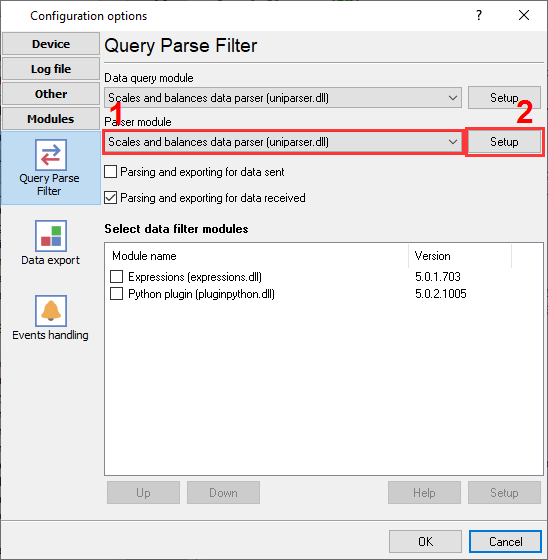
Weight scales and balanced plugin selection to poll a device and parse incoming data.
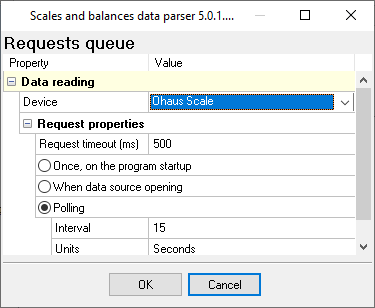
Weight scales and balanced plugin configuration: weight scale type and polling interval.
Ready to connect RS232 Weight Scale to Microsoft SQL Server?
2. Database Setup: Microsoft SQL Server
Use the built-in SQL Server Native Client or OLE DB provider within the Data Logger's ODBC export module. Windows Authentication is seamlessly supported if the logger service account has database access.
Use the following SQL script to create your target table. Use DATETIME2 instead of DATETIME for higher precision timestamping, which is critical for high-frequency industrial serial logging.
CREATE TABLE SerialData (
  RecordID INT IDENTITY(1,1) PRIMARY KEY,
  LogTime DATETIME2 DEFAULT SYSUTCDATETIME(),
  PortID NVARCHAR(20),
  SensorReading FLOAT
);
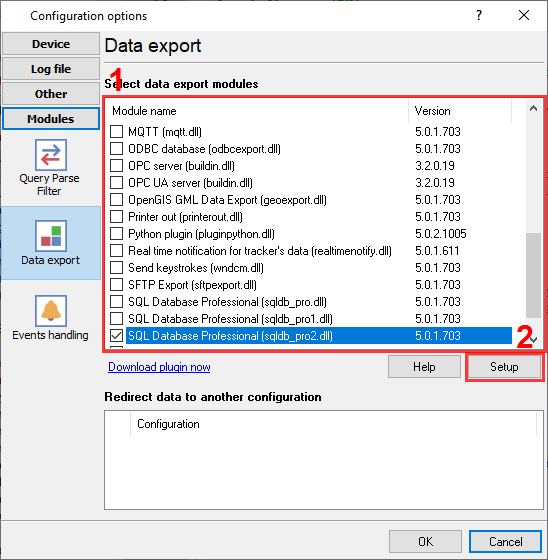
Microsoft SQL Server connector in our logger.
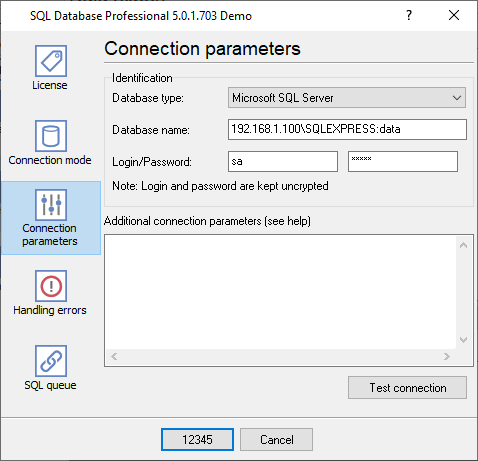
SQLServer database connection settings. For example, SQL Express
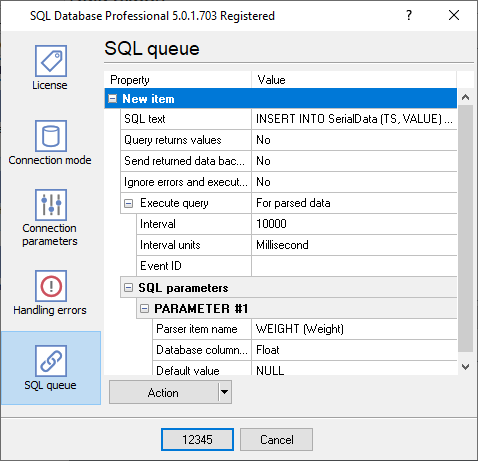
SQL queue.
3. Protocol-Specific Troubleshooting
- Garbage characters appearing on the screen: This almost always indicates a baud rate or parity mismatch. 9600-8-N-1 is standard, but older Mettler Toledo or Ohaus scales frequently use 2400 baud or 7-Even-1 parity. Check the hardware manual.
- Is it possible to process stable weight only and ignore intermediate values?: Use one of our filter plugins, and for example, ignore all records without the "stable" signature in a data packet.
- Is it possible to process weight values greater that 100.0 kg?: The Expressions filter plugin allows you to using any math expression For example, the following command: DISCARD_DATA_PACKET_IF(WEIGHT < 100).
4. Database-Specific Troubleshooting
- Login failed for user / Access Denied: If running RS232 Data Logger as a background Windows Service, ensure the service is running under a domain account with db_datawriter roles, rather than the default 'Local System' account. Or create a separate user with the 'SQL Server' authentication method.
- What if my database is offline? Will I lose my data?: Use the SQL Database Pro plugin. It can write data to a temporary file while your database is offline and restore it later.
- The code only works when you send numbers. When I'm trying to send a letter, it does not work.: 1. You should declare the parser variable as a string. 2. Your table should contain the column with the 'VARCHAR' or 'NVARCHAR' type. The size of this column should be enough for your data. 3. You should select the 'string' data type for the corresponding column in the data export plugin on the 'Binding' page.